Under Desk Power Strip: Clamp Power That Moves With Sit-Stand
Desk accessories
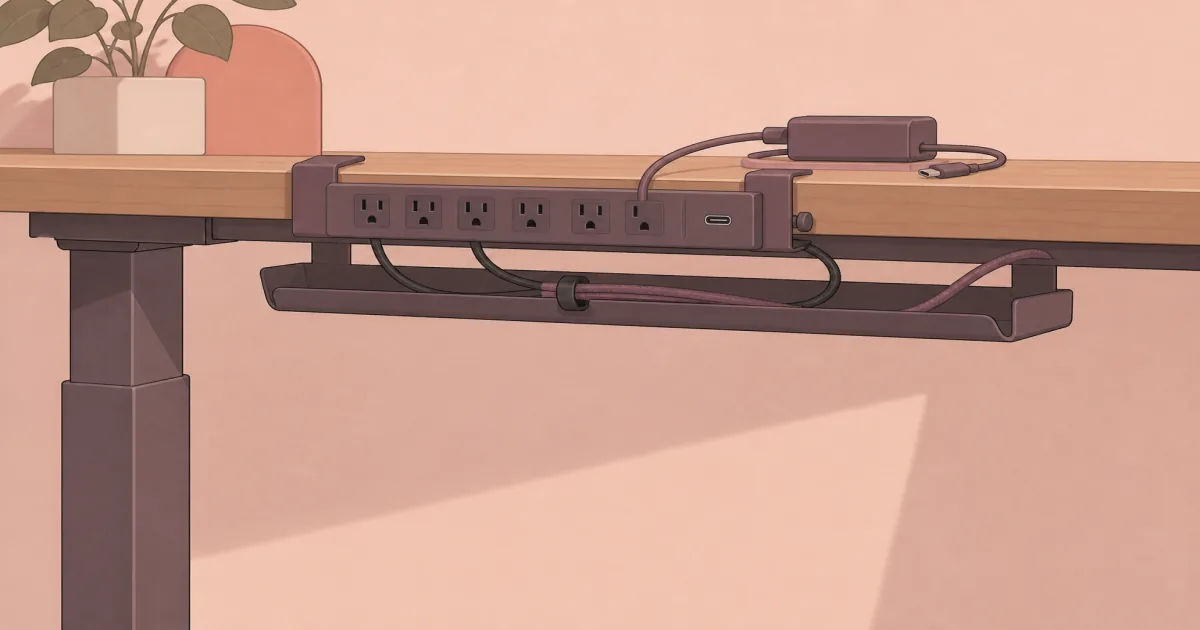
An under desk power strip belongs on the desktop edge so outlets rise and fall with a standing desk. Anker Nano is the premium clamp; Jgstkcity covers a lower-cost edge mount.
Our picks
Floor power strips fight standing desks. Every time the top rises, device cords stretch toward a strip that stayed behind on the carpet. The fix is boring and effective: clamp power to the desk so the outlets move with your monitors and laptop dock.
This is not a substitute for cable management for desk. You still want a tray and a sleeved run to the wall. The strip is simply the power source those pieces feed. If your laptop also needs HDMI, Ethernet, or more USB ports, pair the strip with a USB hub for desk instead of expecting the power strip to solve data ports.
Browse more power and desk electronics in the desk accessories section.
What to measure first
- Desk edge thickness at the clamp zone.
- Skirt or crossbar clearance under the rear edge.
- Cord length to the wall at full standing height.
- Which side of the desk leaves room for a monitor arm clamp.
If the edge is fully enclosed, a clamp strip will not save you. Look at grommet power or a different desk.
Setup kit: premium clamp, then budget edge mount
1. Anker Nano Power Strip (desk clamp). This is the under desk power strip to buy when the edge is clampable and you want USB-C charging plus dual-zone AC outlets in one mount. Silicone pads protect the top. Put daily plugs where your hands are and keep bulkier bricks in the lower zone or a tray. Shop Anker Nano.
2. Jgstkcity desk clamp power strip. Keep this as the value kit piece when you need more USB ports and a lower price. Confirm the max desktop thickness against your top. It is a fine spare-room or budget standing-desk mount when Anker feels like overspend. Shop Jgstkcity.
Clamp strip vs floor strip vs tray-only
A tray without desk-mounted power still leaves device cords chasing a floor outlet when you stand.
Standing desk habits that prevent yanked plugs
Plug monitors, dock, and lamp into the clamped strip. Leave one slack mains cord from the strip to the wall. Do not daisy-chain a second cheap strip under the first unless the listing and your load clearly allow it.
When you raise the desk the first time, watch every cable. Anything that goes tight at standing height needs more slack or a shorter device cord.
Pair power with cable routing
After the strip is mounted, add a clamp tray for adapters and a sleeve for the wall run. That pairing is what standing desk cable management is for. Power on the edge. Slack in the tray. One clean line to the outlet.
Load planning so you do not trip the strip
Add up the devices you actually plug in on a workday: monitors, dock, laptop brick if you still use one, lamp, speaker, phone chargers. Stay under the strip’s stated wattage with room to spare. USB-C laptop charging on the Anker is convenient, but a hungry dock plus two monitors can still want AC outlets for the heavy bricks.
Spread bulky wall warts across spaced outlets. Stacking every transformer on adjacent sockets is how people end up with half the strip blocked. Put always-on gear on the lower zone or in the tray so the top edge stays for things you unplug often.
Renters, skirted desks, and awkward edges
Many standing desks ship with a rear skirt or cable channel that looks tidy and quietly ruins clamp plans. Measure the real clampable lip, not the marketing photo. If the edge is beveled past what the jaws allow, pick a different mount side or accept a tray-plus-floor-strip setup for that desk.
Renters should prefer silicone-lined clamps over screw-in power modules. You want the power hub to leave with you. The Anker and Jgstkcity styles are built for that. Confirm you can remove the clamp without scarring a laminate top you do not own.
A simple install order that avoids rework
- Clear the rear edge and dry-fit the clamp.
- Tighten until the strip does not twist when you unplug a cable one-handed.
- Plug in the wall cord with standing-height slack.
- Add the cable tray for bricks.
- Raise and lower the desk once while watching every lead.
If anything tugs, fix slack before you call the strip a failure. Most “bad power strip” complaints on standing desks are short cords and floor hubs, not the clamp idea itself. Once the motion test passes, label the wall plug so nobody “tidies” your slack into a trip hazard the next morning.
Bottom line: An under desk power strip should clamp to the top so outlets rise with you. Start with the Anker Nano clamp strip, keep Jgstkcity as the budget alternative, and finish the job with a tray and sleeve. More desk setup guides are on the blog and homepage.
Frequently Asked Questions
What is an under desk power strip?
It is a surge strip or charging station that clamps to the desk edge so outlets sit at work height. On a standing desk, the strip moves with the top instead of staying on the floor.
Is this the same as cable management?
No. Cable management for desk is mostly trays and sleeves that route cords. An under desk power strip is the power source those cords plug into.
Will a clamp work on a standing desk?
Yes if the rear or side edge is clampable and within the listed thickness. Thick skirts, beveled edges, and crossbars can block the jaws. Measure before you order.
Anker or Jgstkcity?
Pick Anker Nano when you want a cleaner clamp, dual-zone layout, and stronger USB-C charging. Pick Jgstkcity when you want more ports for less money and can accept a simpler build.
How long should the cord be?
Long enough to reach the wall at full standing height with slack left over. A strip that yanks the wall plug when you rise is worse than a floor strip.
Do I still need a cable tray?
Often yes. Mount the strip on the edge, then park bricks and excess slack in a tray so nothing swings into your knees. Compare best under desk cable tray picks, or see standing desk cable management for the sit-stand slack test.
Who should skip a clamp power strip?
Skip it if your desk has no usable edge, or if you prefer a single floor box for a fixed table that never moves.