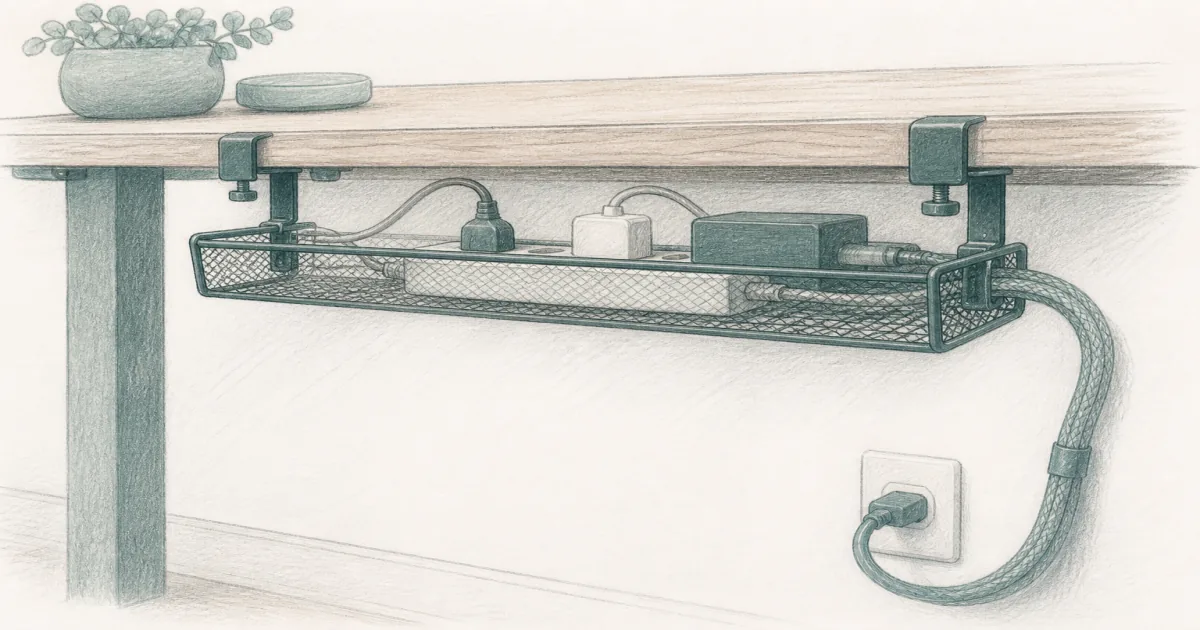
Best Under Desk Cable Tray (2026): Clamp and Screw Picks
Desk accessories
An under desk cable tray parks the power strip and bricks under the top so cords stop snagging your knees. Start with the Litwaro 25" clamp tray on most sit-stand desks, or a screw-mount tray when the underside is clear.
Our picks
The best under desk cable tray for most sit-stand desks is the Litwaro 25" when you need a wide no-drill basket for a power strip and adapters. Bricks stop dangling into your knees, and a sit-stand raise stops yanking a USB port because the power source now travels with the top. That is a different job from a full cable management for desk kit, which also wraps the drop to the wall, and from under desk storage, which is for drawers and bins.
Browse more desk accessories after the cords are parked. If the screen height is still wrong, fix that next with a monitor arm.
What should you measure before buying an under desk cable tray?
Measure three things: the rear edge thickness where a clamp can bite, the length of the power strip the tray must hold, and the floor-to-underside gap you need to keep at your knees. Those three numbers pick the tray for you.
Desk thickness and rear overhang
The Litwaro clamp fits desktops from about 0.4 inches to 2.4 inches thick. The spec sounds generous until you meet a desk with a thick decorative skirt or a modesty panel across the back. There, the jaws have nothing to grab and the tray will not sit level.
Hold a tape against the rear edge and find a spot where the clamp can close on a clean lip. If the top is glass, beveled, or fully boxed in, plan on a screw-mount tray or a different spot for the strip.
Power strip length and basket size
A common 6-outlet strip runs about 12 inches long. The Litwaro 25" basket holds that strip plus a laptop brick and a monitor brick without stacking. The Litwaro 13.38" is the same idea for a short strip and one brick.
Measure your actual strip before you choose. A long surge bar that sits neatly in the 25-inch tray will hang crooked in the compact one.
Knee clearance
The clamp basket hangs about 4.72 inches deep from the underside. The VIVO screw tray is about 3 inches deep, roughly 1.7 inches shallower, which is the difference between clearing your knees and bumping the tray every time you scoot in.
Sit down and measure from the floor to the desk underside at your knee, then leave a little room. On a shallow fixed desk, the thinner tray usually wins.
Clamp or screw-mount: which one fits your desk?
Choose a clamp tray if you rent, move the tray, or want no holes in the top. Choose a screw-mount tray if you own the desk, the underside is a clean panel, and you want the thinnest profile that will not loosen after months of height changes.
When a clamp tray wins
A clamp installs in a few minutes and comes off without a mark, which matters on a rental or a desk you might replace. The rubber pads under the jaws protect laminate and wood. The trade is that the tray needs a real overhang, and a clamp can loosen after a lot of sit-stand travel, so check the torque after the first week.
When a screw-mount tray wins
Screws into wood or particle board hold a low-profile tray flat against the underside with no jaw depth. The VIVO mounts on holes 11 inches apart and includes the screws. It is the pick when the underside is clear and you want a tray that cannot work loose. The trade is permanent holes.
Quick comparison
Top pick: Litwaro 25" Under Desk Cable Management Tray
The Litwaro 25" is the under desk cable tray to buy first on most US home offices. The carbon-steel mesh basket is wide enough for a strip plus laptop and monitor bricks, and it holds about 15 pounds. Rubber-padded clamps grab laminate and wood without drilling, which matters on rental desks and on sit-stand tops you might replace later.
Face the basket inward when you want cords fully hidden. Face it outward when you still flip a strip switch a few times a day. Confirm the rear skirt will not block the jaws before you order.
Who it is for: Standing desks and fixed desks with a clampable rear edge and a normal surge strip.
Skip if: The top is glass, fully skirted, or too thin for a secure clamp bite.
Best screw-mount: VIVO DESK-AC06-1C
The VIVO DESK-AC06-1C is the pick when you own the desk and want a thinner steel tray that will not loosen after months of height changes. Screws go into wood or particle board. The open front makes it easy to drop in a cable without dumping the whole strip.
It is lower profile than a deep clamp basket, so it is kinder to knee clearance on shallow desks. It is not the renter-friendly option.
Who it is for: Permanent home offices where a clean underside install beats clamp convenience.
Skip if: You cannot put holes in the top, or the underside panel is too thin for the included screws.
Best compact clamp: Litwaro 13.38"
The Litwaro 13.38" is the same clamp idea in a smaller basket. Use it on a 40-inch desk, a spare-room setup, or any top where a 25-inch tray looks like overkill for one strip and two bricks.
Measure the strip first. A long surge bar that fit the 25-inch model may sit crooked here. For the full sit-stand slack workflow after install, follow standing desk cable management.
Who it is for: Narrow desks and minimal cable loads.
Skip if: You already know you need room for a fat strip plus a pile of adapters.
Will a cable tray keep a standing desk from yanking cords?
Only if the strip rides in the tray and just one slack cord runs to the wall. Everything else plugs into the strip inside the tray, so when the desk rises the whole power block travels with it and nothing tugs.
The slack test after install
Leave one long cord from the tray to the wall outlet, then raise the desk to its top height once and watch what pulls tight. Trim or add slack until nothing is taut at the highest position. Fix the length before you sleeve anything, because a pretty wrap hides a cord that is about to yank.
Why adhesive trays fail on a moving desk
A sit-stand desk moves up and down many times a day. Adhesive pads and stick-on clips peel under that repeated motion, and a tray that lets go drops the strip onto the floor. Clamp or screw the tray so the power stays attached to the top.
How do you install a tray so cords stop snagging?
- Mount the tray near the rear edge so device cords stay short on the desktop.
- Plug monitors, dock, and lamp into the strip inside the tray.
- Leave one slack power cord to the wall. Raise the desk once and check what tugs.
- Only then sleeve or clip the vertical drop. Length first, tidy second.
- Recheck clamp torque or screw tightness after a week of sit-stand use.
If a USB hub still hangs off the rear edge, park it on the desktop and run slack into the tray, as we cover in our USB hub for desk guide.
Cable tray vs clips vs under desk storage
A tray parks power, while clips only tidy short runs. Most messy desks need both, plus a sleeve for the drop to the wall. Do not put liquids or heavy files in a mesh tray built for cords.
Who should skip an under desk cable tray
Skip it if every cord already runs through a built-in raceway that works. Skip it if you only have a floor box on a fixed table that never moves and you like that layout. And skip shallow trays that cannot hold your actual strip. Measure before you buy so you do not have to return it.
Bottom line: Buy the Litwaro 25" under desk cable tray for most sit-stand desks, the VIVO DESK-AC06-1C when you want a screw-mount low profile, and the Litwaro 13.38" when a compact clamp is enough. Park the strip under the top, leave slack to the wall, then tidy the drop.
Frequently Asked Questions
What is the best under desk cable tray?
Start with the Litwaro 25" clamp tray if you want a wide no-drill basket for a standing desk. Choose the VIVO DESK-AC06-1C when you want a screw-mount tray that stays low under the top. Use the Litwaro 13.38" when a compact clamp is enough.
What desk thickness does a clamp tray fit?
The Litwaro clamp fits desktops from about 0.4 inches to 2.4 inches thick. A thicker decorative skirt, a modesty panel, or a glass top is the usual blocker, so measure the rear edge where the jaws will bite before you order.
How long a tray do I need for a power strip?
A common 6-outlet strip is about 12 inches long, so a 25-inch basket holds it with room for two power bricks. Buy the compact tray only for a short strip or a single brick.
Clamp tray or screw-mount tray?
Clamp is the default for renters and people who move the tray. Screw-mount is better when the underside is clear, you own the desk, and you want a thinner profile that cannot loosen after months of height changes.
Will a tray work on a standing desk?
Yes if the strip lives in the tray and only one slack cord runs to the wall. See standing desk cable management for the sit-stand slack test after install.
Is an under desk cable tray the same as under desk storage?
No. Under desk storage is for drawers, bins, and things you grab. A cable tray is for power and cords. Keep liquids and heavy files out of the tray.
Do I still need an under desk power strip?
Often yes. A clamp under desk power strip puts outlets at desk height. The tray parks bricks and leftover length so nothing swings into your knees.
Who should skip a clamp tray?
Skip it if your desk has a full skirt, a glass top, or no rear overhang. In that case look for a screw-mount tray on a clear underside panel, or rethink where the strip lives.